Agentic SDLC Adoption Guide
Interactive Guide
Software engineering teams are being asked to adopt agents into real delivery work.
Agents can help design, build, test, refactor, document, and operate software. That part is no longer the hard question. The harder question is whether engineers, architects, and technical leaders can keep agent-assisted work aligned with the domain, architecture, security posture, and business outcome.
This workbench gives teams a way to do that. Start with the problem, workflow, constraints, architecture options, tests, and review gates. Then use agents to help execute the work, update artifacts, strengthen tests, and prepare review evidence.
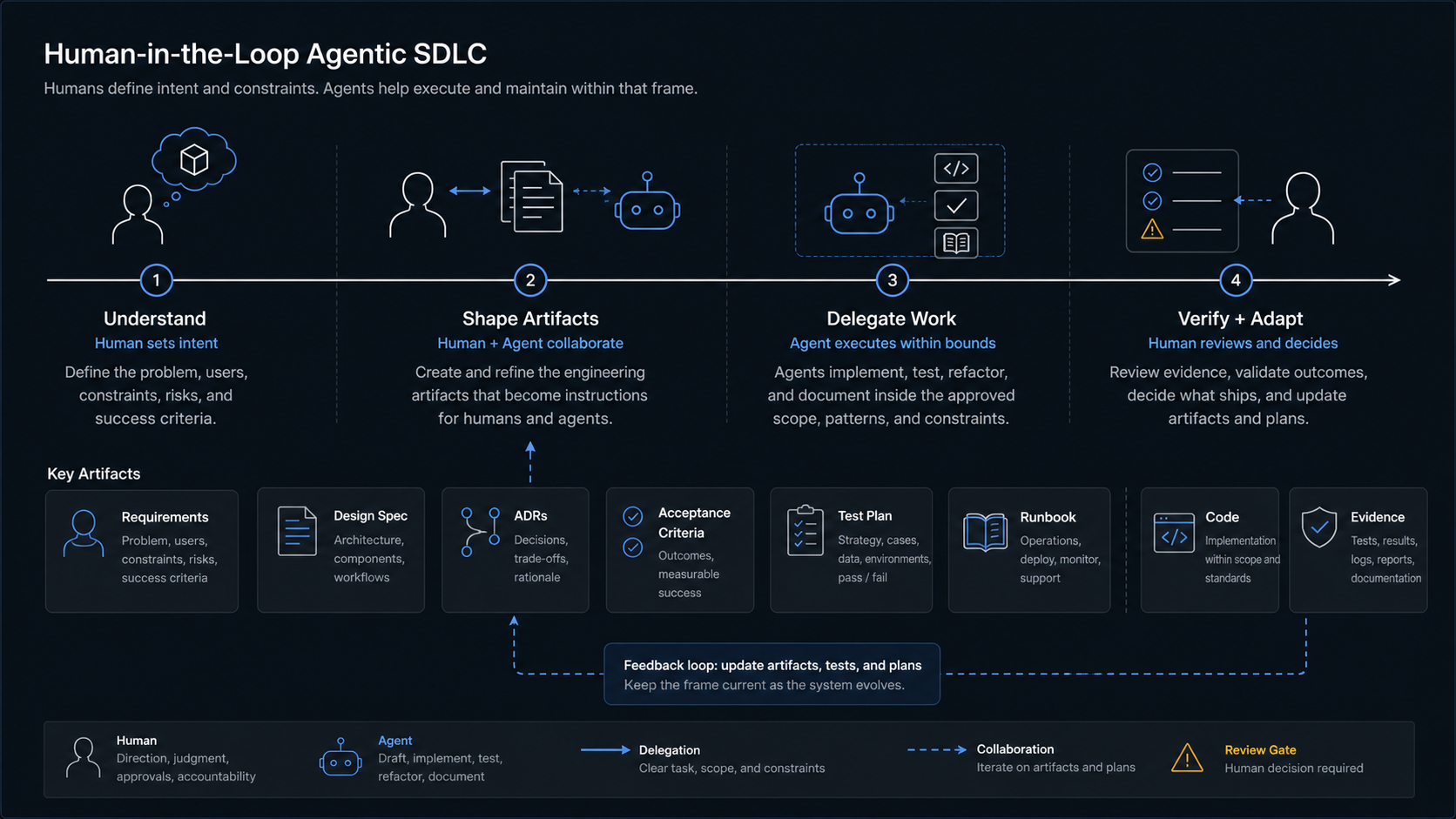
Use the full path when a team needs an adoption model. Use one section when the team only needs help with intake, architecture, validation, security, readiness, roadmap planning, or agent handoff. Export a project-state packet when useful, and give the agent the context files before asking for help.
Core Shape
- Humans define the problem, architecture, constraints, standards, and acceptance path.
- Engineering artifacts turn that intent into instructions both humans and agents can use.
- Agents execute bounded work inside the frame set by those artifacts.
- Humans review, verify, and decide whether the work is correct, secure, maintainable, and aligned with the business problem.
- Teams use agents to help keep artifacts, tests, and review gates current as the work changes, while humans stay responsible for direction, judgment, and acceptance.
The point is disciplined agentic execution: humans define the engineering frame, artifacts make the frame usable, agents help execute and maintain the work inside it, and humans accept or reject the result.
Selective Use
Teams can use the whole workbench or select the parts that match the work in front of them. A team might use the architecture section to define agent boundaries, the validation section to strengthen acceptance evidence, or the prompt section to turn one task into a safer work order.
The same operating shape applies even when the team uses one section: humans define the frame, agents help execute and maintain the supporting artifacts, and humans verify the result.
What It Helps With
Intake and product shape
Name the product, users, constraints, business outcome, MVP scope, non-goals, and current delivery system before choosing agent workflows.
Architecture and readiness
Compare options, score tradeoffs, model workflow and data, define target architecture, and keep validation, environments, security, governance, and release gates explicit.
Agent-ready work orders
Export a project-state packet and use the Markdown context, prompt library, templates, and source foundation to get bounded agent assistance.
How To Navigate
Use it end to end
Start at intake when a team needs to decide how agents should enter a project or delivery system.
Skip to the section you need
Use product canvas, discovery, workflow, architecture matrix, readiness, roadmap, worksheet, or prompt sections independently when that is the live question.
Give the agent the frame
Pair any section with the agent context packet so the agent helps from intent, constraints, design, and verification.
Use With An Agent
Agents should use agent-context.md as the primary context entry point. The workbench HTML is useful for people, but the Markdown packet is the cleaner source for agents.
Recommended v1 context order:
agent-context.mdagent-guide.md- The relevant section file under
sections/ agent-prompts.md- The exported project-state JSON, if you have one
The exported packet uses schema version 2.0.0. It includes project profile, section completion, worksheet values, checklist state, architecture scores, readiness scores, risk register rows, roadmap fields, prompt-library metadata, and raw local state.
llms.txt is published as a site map for agent tools that look for it. It is a context aid, not an enforcement mechanism, indexing guarantee, or promise that a model will use the guide correctly.
Privacy And Safe Use
The workbench stores entries in your browser by default. Exported project-state JSON is controlled by you and may contain sensitive project information.
Do not paste secrets, credentials, private customer data, regulated data, or proprietary project details into external agents unless your local policy allows that use.
This site is static, but normal hosting request logs may still record page and asset requests. The workbench itself does not need a server account or backend storage.
High-Stakes Use
This material does not replace local expert review. For high-stakes systems, route outputs through qualified security, privacy, legal, compliance, clinical, financial, safety, regulated-data, and domain architecture reviewers before relying on them.
Current Through
This v1 guide is current through July 6, 2026. The source library is reviewed through a monthly heartbeat, and heartbeat findings are review candidates. Public guidance changes only through the normal branch, pull request, validation, and human review path.